Instructions to use AnkitAI/Parable-Granite-4.1-8B-Claude-Fable-5-GGUF with libraries, inference providers, notebooks, and local apps. Follow these links to get started.
- Notebooks
- Google Colab
- Kaggle
- Local Apps Settings
- llama.cpp
How to use AnkitAI/Parable-Granite-4.1-8B-Claude-Fable-5-GGUF with llama.cpp:
Install (macOS, Linux)
curl -LsSf https://llama.app/install.sh | sh # Start a local OpenAI-compatible server with a web UI: llama serve -hf AnkitAI/Parable-Granite-4.1-8B-Claude-Fable-5-GGUF:Q4_K_M # Run inference directly in the terminal: llama cli -hf AnkitAI/Parable-Granite-4.1-8B-Claude-Fable-5-GGUF:Q4_K_M
Install from WinGet (Windows)
winget install llama.cpp # Start a local OpenAI-compatible server with a web UI: llama serve -hf AnkitAI/Parable-Granite-4.1-8B-Claude-Fable-5-GGUF:Q4_K_M # Run inference directly in the terminal: llama cli -hf AnkitAI/Parable-Granite-4.1-8B-Claude-Fable-5-GGUF:Q4_K_M
Use pre-built binary
# Download pre-built binary from: # https://github.com/ggerganov/llama.cpp/releases # Start a local OpenAI-compatible server with a web UI: ./llama-server -hf AnkitAI/Parable-Granite-4.1-8B-Claude-Fable-5-GGUF:Q4_K_M # Run inference directly in the terminal: ./llama-cli -hf AnkitAI/Parable-Granite-4.1-8B-Claude-Fable-5-GGUF:Q4_K_M
Build from source code
git clone https://github.com/ggerganov/llama.cpp.git cd llama.cpp cmake -B build cmake --build build -j --target llama-server llama-cli # Start a local OpenAI-compatible server with a web UI: ./build/bin/llama-server -hf AnkitAI/Parable-Granite-4.1-8B-Claude-Fable-5-GGUF:Q4_K_M # Run inference directly in the terminal: ./build/bin/llama-cli -hf AnkitAI/Parable-Granite-4.1-8B-Claude-Fable-5-GGUF:Q4_K_M
Use Docker
docker model run hf.co/AnkitAI/Parable-Granite-4.1-8B-Claude-Fable-5-GGUF:Q4_K_M
- LM Studio
- Jan
- vLLM
How to use AnkitAI/Parable-Granite-4.1-8B-Claude-Fable-5-GGUF with vLLM:
Install from pip and serve model
# Install vLLM from pip: pip install vllm # Start the vLLM server: vllm serve "AnkitAI/Parable-Granite-4.1-8B-Claude-Fable-5-GGUF" # Call the server using curl (OpenAI-compatible API): curl -X POST "http://localhost:8000/v1/chat/completions" \ -H "Content-Type: application/json" \ --data '{ "model": "AnkitAI/Parable-Granite-4.1-8B-Claude-Fable-5-GGUF", "messages": [ { "role": "user", "content": "What is the capital of France?" } ] }'Use Docker
docker model run hf.co/AnkitAI/Parable-Granite-4.1-8B-Claude-Fable-5-GGUF:Q4_K_M
- Ollama
How to use AnkitAI/Parable-Granite-4.1-8B-Claude-Fable-5-GGUF with Ollama:
ollama run hf.co/AnkitAI/Parable-Granite-4.1-8B-Claude-Fable-5-GGUF:Q4_K_M
- Unsloth Studio
How to use AnkitAI/Parable-Granite-4.1-8B-Claude-Fable-5-GGUF with Unsloth Studio:
Install Unsloth Studio (macOS, Linux, WSL)
curl -fsSL https://unsloth.ai/install.sh | sh # Run unsloth studio unsloth studio -H 0.0.0.0 -p 8888 # Then open http://localhost:8888 in your browser # Search for AnkitAI/Parable-Granite-4.1-8B-Claude-Fable-5-GGUF to start chatting
Install Unsloth Studio (Windows)
irm https://unsloth.ai/install.ps1 | iex # Run unsloth studio unsloth studio -H 0.0.0.0 -p 8888 # Then open http://localhost:8888 in your browser # Search for AnkitAI/Parable-Granite-4.1-8B-Claude-Fable-5-GGUF to start chatting
Using HuggingFace Spaces for Unsloth
# No setup required # Open https://huggingface.co/spaces/unsloth/studio in your browser # Search for AnkitAI/Parable-Granite-4.1-8B-Claude-Fable-5-GGUF to start chatting
- Pi
How to use AnkitAI/Parable-Granite-4.1-8B-Claude-Fable-5-GGUF with Pi:
Start the llama.cpp server
# Install llama.cpp: brew install llama.cpp # Start a local OpenAI-compatible server: llama serve -hf AnkitAI/Parable-Granite-4.1-8B-Claude-Fable-5-GGUF:Q4_K_M
Configure the model in Pi
# Install Pi: npm install -g @mariozechner/pi-coding-agent # Add to ~/.pi/agent/models.json: { "providers": { "llama-cpp": { "baseUrl": "http://localhost:8080/v1", "api": "openai-completions", "apiKey": "none", "models": [ { "id": "AnkitAI/Parable-Granite-4.1-8B-Claude-Fable-5-GGUF:Q4_K_M" } ] } } }Run Pi
# Start Pi in your project directory: pi
- Docker Model Runner
How to use AnkitAI/Parable-Granite-4.1-8B-Claude-Fable-5-GGUF with Docker Model Runner:
docker model run hf.co/AnkitAI/Parable-Granite-4.1-8B-Claude-Fable-5-GGUF:Q4_K_M
- Lemonade
How to use AnkitAI/Parable-Granite-4.1-8B-Claude-Fable-5-GGUF with Lemonade:
Pull the model
# Download Lemonade from https://lemonade-server.ai/ lemonade pull AnkitAI/Parable-Granite-4.1-8B-Claude-Fable-5-GGUF:Q4_K_M
Run and chat with the model
lemonade run user.Parable-Granite-4.1-8B-Claude-Fable-5-GGUF-Q4_K_M
List all available models
lemonade list
- Hermes Agent
How to use AnkitAI/Parable-Granite-4.1-8B-Claude-Fable-5-GGUF with Hermes Agent:
Start the llama.cpp server
# Install llama.cpp: brew install llama.cpp # Start a local OpenAI-compatible server: llama serve -hf AnkitAI/Parable-Granite-4.1-8B-Claude-Fable-5-GGUF:Q4_K_M
Configure Hermes
# Install Hermes: curl -fsSL https://hermes-agent.nousresearch.com/install.sh | bash hermes setup # Point Hermes at the local server: hermes config set model.provider custom hermes config set model.base_url http://127.0.0.1:8080/v1 hermes config set model.default AnkitAI/Parable-Granite-4.1-8B-Claude-Fable-5-GGUF:Q4_K_M
Run Hermes
hermes
- Atomic Chat
- OpenClaw
How to use AnkitAI/Parable-Granite-4.1-8B-Claude-Fable-5-GGUF with OpenClaw:
Start the llama.cpp server
# Install llama.cpp: brew install llama.cpp # Start a local OpenAI-compatible server: llama serve -hf AnkitAI/Parable-Granite-4.1-8B-Claude-Fable-5-GGUF:Q4_K_M
Configure OpenClaw
# Install OpenClaw: npm install -g openclaw@latest # Register the local server and set it as the default model: openclaw onboard --non-interactive --mode local \ --auth-choice custom-api-key \ --custom-base-url http://127.0.0.1:8080/v1 \ --custom-model-id "AnkitAI/Parable-Granite-4.1-8B-Claude-Fable-5-GGUF:Q4_K_M" \ --custom-provider-id llama-cpp \ --custom-compatibility openai \ --custom-text-input \ --accept-risk \ --skip-health
Run OpenClaw
openclaw agent --local --agent main --message "Hello from Hugging Face"
🪶 Parable-Granite-8B — trained on genuine Claude Fable 5 agent traces
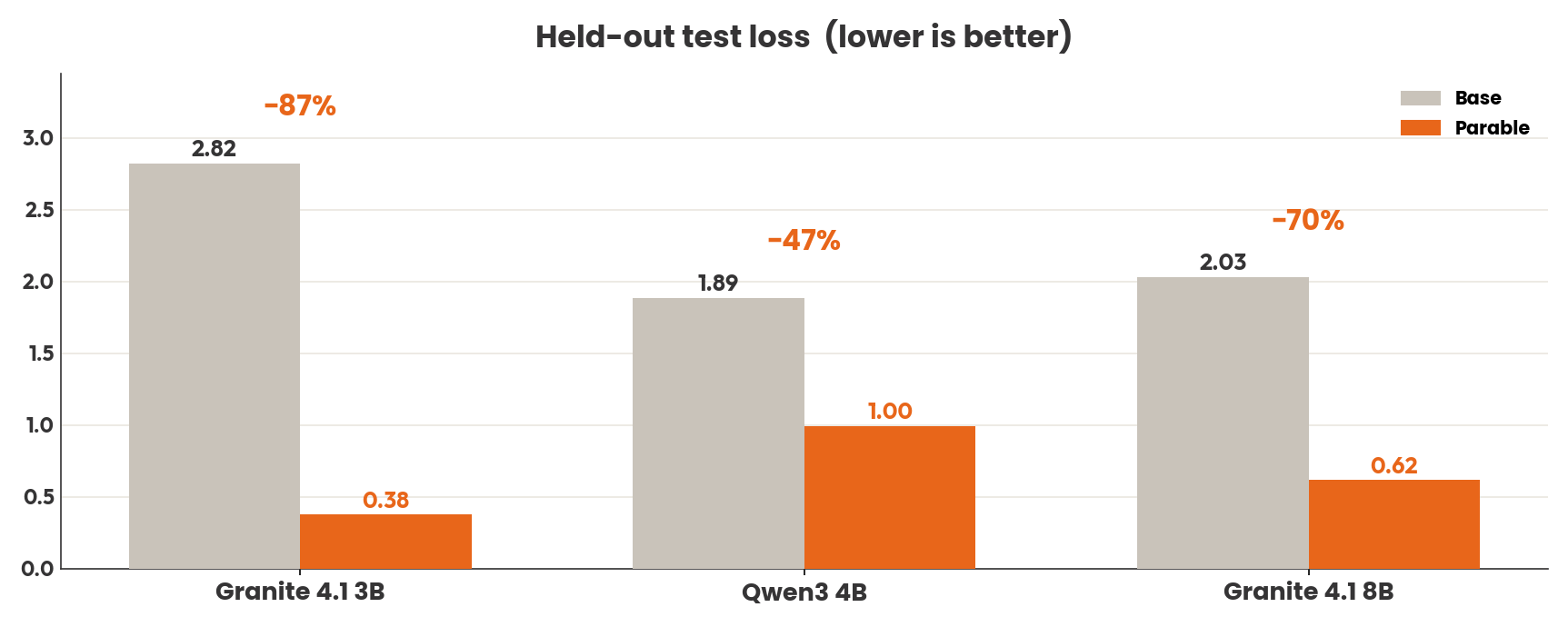
The strongest Parable. Planning, tool use, and <think> reasoning distilled from real Claude Fable 5 and GPT-5.5 agent sessions — 70% lower held-out test loss than its base, and past the 0.71 mark the 9B-class incumbent reports on this data family.
~6 GB of RAM is all you need. The Q4 build fits comfortably on an ordinary laptop or a mid-range GPU. One command and you have a private, offline reasoning model on your machine:
ollama run hf.co/AnkitAI/Parable-Granite-4.1-8B-Claude-Fable-5-GGUF:Q4_K_M
Parable-Granite-4.1-8B is an ibm-granite/granite-4.1-8b fine-tune trained on real multi-step agent sessions: planning, tool use, and <think> reasoning captured from actual Claude Fable 5 and GPT-5.5 agent work, not synthetic Q&A. It is the largest release in the Parable series.
Announcements
🔮 v2 is coming. The 3B just got the v2 treatment (13× corpus, rebuilt recipe) — the same upgrade lands here next. Same links, in-place.
📦 Full family. This 8B is the largest Parable. Also available: 3B Granite, 8B Qwen, 4B Qwen — same recipe, no matter your hardware. Everything lives in the Parable collection.
Pick your size
| File | Size | Fits in | Notes |
|---|---|---|---|
| Q4_K_M | 4.8 GB | ~6 GB RAM/VRAM | ⭐ Recommended — best size/quality balance |
| Q5_K_M | 5.6 GB | ~7 GB | Higher quality |
| Q6_K | 6.4 GB | ~7.5 GB | Near-lossless |
| Q8_0 | 8.3 GB | ~9.5 GB | Maximum quality |
Full-precision safetensors (vLLM, transformers, further fine-tuning): Parable-Granite-4.1-8B-Claude-Fable-5
How to run it
Ollama (shorter command via the Parable namespace, or pull directly from this repo):
ollama run parable/granite4.1-fable:8b
# or straight from this repo:
ollama run hf.co/AnkitAI/Parable-Granite-4.1-8B-Claude-Fable-5-GGUF:Q4_K_M
llama.cpp:
llama-cli -m Parable-Granite-4.1-8B-Claude-Fable-5-GGUF-Q4_K_M.gguf --jinja \
-p "Write a bash one-liner to find the 10 largest files in a directory tree."
LM Studio: lms get parable/granite4.1-fable (parable on LM Studio Hub), or paste this repo URL.
Python (llama-cpp-python):
from llama_cpp import Llama
llm = Llama.from_pretrained(
repo_id="AnkitAI/Parable-Granite-4.1-8B-Claude-Fable-5-GGUF",
filename="*Q4_K_M.gguf", n_ctx=8192,
)
out = llm.create_chat_completion(
messages=[{"role": "user", "content": "Write a Python function that retries an HTTP request with exponential backoff."}],
max_tokens=3000, temperature=0.7,
)
print(out["choices"][0]["message"]["content"])
Thinking mode
Every answer opens with a <think>...</think> reasoning block before the final answer — a behavior this fine-tune adds to Granite. llama.cpp's --jinja chat mode separates it automatically; strip it before showing replies to end users.
Sampling: temperature 0.7, top_p 0.95, and budget max_tokens generously (at least 2500) — trace-trained models think at length before answering.
Evaluation
Held-out test split, identical evaluation code and context length for base and fine-tune:
| Metric | Base Granite-4.1-8B | Parable | Δ |
|---|---|---|---|
| Test loss | 2.030 | 0.617 | −70% |
Qualitative review (34 coding/terminal/debugging prompts, strictly graded by mentally executing every answer): 20/34 fully correct, 32/34 correct or partially correct. We publish these numbers because strict qualitative grading is rare in this niche; judge accordingly.
For reference, the strongest published fine-tune on this data family (a 9B) reports 0.71 validation loss. Cross-repo numbers are indicative only: splits, tokenizers, and context lengths differ (ours is measured at 1,024 tokens).
Function calling (BFCL V3, AST subset)
Measured 2026-07-29: bfcl-eval at gorilla main, prompting mode, Q4_K_M
GGUFs served by llama.cpp on a T4, base and Parable under the identical
harness. Categories: simple_python / multiple / parallel /
parallel_multiple (400/200/200/200 items). Raw generations and score
files: parable-v2-artifacts
under verify/bfcl/.
DNF. The run hit its 3-hour GPU budget: this chat variant's think blocks push most responses to the 4,096-token per-request cap, about 35 GPU-hours of decode for the full suite at T4 speed, so it cannot complete under the same budget every other row got. We report that rather than tightening the token cap for one model. For function-calling harnesses, use the base model; the 3B sibling's card shows the measured pattern on these categories.
Training data
- Glint-Research/Fable-5-traces: 4.4k real Claude Fable 5 coding-agent session traces with
<think>reasoning and tool calls (AGPL-3.0) - Roman1111111/gpt5.5-terminal: terminal-agent task solutions (MIT)
Every example passed a quality gate (schema validation, secrets scrub, length filtering) before training. QLoRA fine-tune (NF4, sequence length 1024) trained on a single 16 GB GPU, quantized with llama.cpp.
Good to know
- Trained for agent work: on ops-style prompts it sometimes (2/34 in our eval) responds with structured tool-call JSON rather than prose. Useful inside agent harnesses; in plain chat, re-prompt or lower the temperature.
- Fine-tuned at 1,024-token sequences; the base model's native 128K-token context remains fully available, so long sessions work, with the fine-tuned behavior strongest in the opening turns.
- As a fine-tune it inherits Granite-4.1-8B's base behaviors and knowledge cutoff. As with any local model, treat generated commands and code as drafts to review.
Base & license
Weights: Apache-2.0 (inherited from ibm-granite/granite-4.1-8b). Training data: Fable-5-traces AGPL-3.0, gpt5.5-terminal MIT — because those traces originate from third-party assistants, the providers' terms may apply to downstream training and distillation. If you plan to build on this model commercially, confirm your use aligns with those terms.
Get Parable
| Platform | |
|---|---|
| Ollama | ollama run parable/granite4.1-fable:8b · parable namespace |
| Ollama (family flagship, best per size) | ollama run parable/fable |
| Hugging Face | GGUF quants, full weights, eval reports |
| LM Studio | lms get parable/granite4.1-fable (parable on LM Studio Hub) |
Citation
The recipe, evaluation methodology and failure analysis behind this model are documented in the tech report:
Aglawe, A. (2026). Agent-Trace Fine-Tuning of Small Language Models under Constrained Compute. Zenodo. doi:10.5281/zenodo.21676407
@misc{aglawe2026agenttrace,
author = {Aglawe, Ankit},
title = {Agent-Trace Fine-Tuning of Small Language Models under Constrained Compute},
year = {2026},
publisher = {Zenodo},
doi = {10.5281/zenodo.21676407},
url = {https://doi.org/10.5281/zenodo.21676407}
}
Acknowledgements
Glint-Research & Roman1111111 for the open trace data · IBM Granite for the base · empero-ai, whose Qwable recipe the Parable series follows · llama.cpp
The strongest Parable. Real Fable 5 reasoning. Yours, offline, right now.
ollama run hf.co/AnkitAI/Parable-Granite-4.1-8B-Claude-Fable-5-GGUF:Q4_K_M
More on the Parable models: ankitaglawe.com/parable
- Downloads last month
- 234,210
4-bit
5-bit
6-bit
8-bit
16-bit
Model tree for AnkitAI/Parable-Granite-4.1-8B-Claude-Fable-5-GGUF
Base model
ibm-granite/granite-4.1-8b